
Professional Virtual Backgrounds with Your Contact Details
Generate a custom video call background that shows your name, title, company and a scannable QR code - so every meeting is an introduction, not just a call.
No design skills needed · Downloads in seconds


What Is a Virtual Background with Contact Info?
A virtual background with contact info is a 1920×1080 image you set inside Zoom, Google Meet or Microsoft Teams. Instead of a blank wall or blurred office, your background shows your name, job title, company, phone, email and a scannable QR code - turning every video call into a networking moment without you saying a word.
Zoom
Set your wCard background in Zoom via Settings → Backgrounds & Effects. Your contact card appears behind you on every call and meeting - no plugin or subscription needed.
- Works on desktop & mobile
- No green screen required
- Upload once, reuse forever
Google Meet
In Google Meet, click the three-dot menu → Change background → Add a background to upload your wCard image. It persists across all your Meet calls.
- Works in browser & app
- Compatible with Google Workspace
- Saved as a custom background
Microsoft Teams
Before or during a Teams meeting, click More → Video effects → Add new to upload your wCard background. It stays in your effects library for future calls.
- Works on Windows, Mac & mobile
- Compatible with Teams & Teams Free
- Saved for future meetings
How to Create Your Virtual Background
Three steps from sign-up to a background that introduces you in every call.
Build your digital card
Add your name, title, company, phone, email and a photo to your wCard dashboard. Your contact info is ready to appear on any background you choose.
Pick a background & layout
Choose from the Unsplash photo library, a solid color or your own image. Then pick a layout - Card, Banner or Minimal - and choose which details appear.
Download & set it in your app
Download your 1920×1080 JPEG in one click, then upload it to Zoom, Google Meet or Microsoft Teams. Done - your next call introduces you automatically.

Three Layouts, One Generator
Pick the style that suits your meeting context. You can regenerate and switch layouts any time from your dashboard.
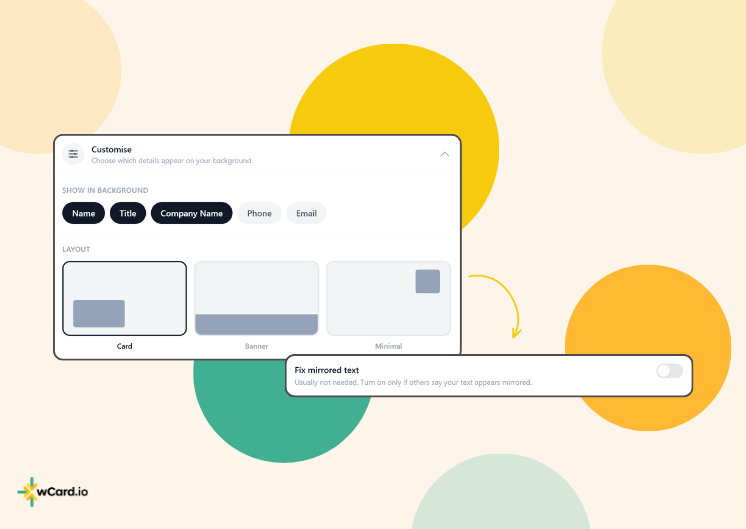
- Card - a rounded contact card at the bottom-left corner
- Banner - a full-width strip across the bottom
- Minimal - a small corner badge that stays out of the way
- QR code included in every layout
Show Only What You Want
Toggle each field on or off with a tap. Keep it simple with just your name and QR code, or go full contact-card mode with every detail visible.
- Name, title, company, phone & email toggles
- QR code links to your full digital card
- Mirror-fix option for cameras that flip text
- Live preview before you download
Why Add Your Contact Details to Your Video Background?
Every call is a networking opportunity. Your background should work as hard as you do.
Instant Introduction
Your name and role are visible from the moment you join. No need to introduce yourself every time - your background does it for you.
Scannable QR Code
Every background includes a QR code that links to your full digital card. Anyone on the call can scan it with their phone camera to save your contact instantly.
No Paper Cards to Carry
Forget printing a stack of cards for a client call. Your background shares your contact info without you lifting a finger - or a card.
Always Professional
Replace a cluttered home background with a clean, branded image. You look intentional and prepared - even on short-notice calls from your kitchen table.
Update Once, Refreshes Everywhere
Change your phone number or title in the wCard dashboard and simply regenerate - no reprinting, no redesign. Your new background is ready in seconds.
Works on Any Platform
One 1920×1080 JPEG works everywhere - Zoom, Google Meet, Microsoft Teams, Webex and any other app that supports custom backgrounds.
Who Uses a Virtual Background with Contact Info?
If you spend time on video calls, your background is prime real estate for making a lasting impression.
Sales & Consultants
Lead every discovery call, demo or follow-up with your name and contact details in plain sight. Prospects scan your QR code before the meeting wraps.
Job Seekers & Interviewees
Stand out in a video interview by showing your name, role and LinkedIn in your background - interviewers notice preparation and professionalism.
Real Estate & Finance
Share your direct line and booking link with every virtual tour or financial review call, so clients never have to search their inbox for your number.
Educators & Coaches
Display your website or booking link during online classes and coaching sessions so students and clients can reach you instantly after the call.
Customer Reviews

My experience with wCard.io has been fantastic! The team is extremely supportive, quick to respond, and a pleasure to collaborate with. I’m really excited about the direction they’re heading and look forward to seeing the platform evolve. Highly recommended for anyone seeking a smart and reliable digital business card solution!

As a gym owner, I’ve found the Digital Business Card from wcard.io to be an absolute game changer! It’s sleek, professional, and super easy to share with clients. I no longer have to worry about running out of physical cards or handing them out at the wrong moment. With just a tap or a link, potential clients can access my contact details, social media, and even schedule their next session. Overall, it’s saved me time and helped me connect with people in a more modern and efficient way. Highly recommend!

As a salon owner, I saved money by using Digital Business Card by wCard.io instead of building a full website. It’s easy to set up, looks professional, and lets me share offers with clients effortlessly. A cost-effective solution that keeps my business connected and engaged!

As a real estate professional in Virginia Beach, providing immediate and effective communication channels for my clients is paramount. wCard.io has significantly enhanced my ability to connect with both buyers and sellers in a dynamic and environmentally friendly way. The platform's user-friendly interface allows for quick updates and sharing of my business card, ensuring my contact information is always accessible and up-to-date.

As a co-founder of Buenavilla Vacation Rental, creating lasting relationships with our guests and partners is at the heart of what we do. wCard.io has been a revolutionary tool in our efforts to connect and network. Its simplicity and efficiency in sharing contact information have allowed us to elevate our customer service experience to new heights.

As a freelancer, wCard.io has been a game-changer for me. The ease of sharing my portfolio and contact information with potential clients is fantastic. Although I wish there were more customization options, it's still an excellent tool for professionals looking to make their mark.

The NFC Business Card from wCard.io has been a game-changer for our company. The ability to instantly transmit contact information with a simple tap has not only streamlined our engagement process but has also sparked conversations about innovation and technology, perfectly complementing our brand image. The durability and sleek design of the NFC card have further impressed our clients and partners. Investing in wCard.io's NFC Business Card has been one of our best decisions, offering a seamless blend of functionality and futuristic appeal.'
Pricing Plans
Choose the plan that suits your business needs.

No Credit Card Required!
- 2 Cards
- Digital Business Card for yourself
- Basic customizations
- wCard Branding
- Include a profile image
- Include a cover image
- Add Education and Experience Tabs
- Add Contact Form
- 5 Leads
- Share your card with QR Code, mail, text, whatsapp, etc
- Unlimited Social Links
- Limited Mobile Numbers and Emails
- Click to Action Button
- Direct WhatsApp Button
- Choose Theme Color from our palette
- 3 Uploads in Portfolio
- Basic Analytics

Premium
1 User
For individuals with fully customizations & advanced features.
Get Started Get StartedEverything included in Free, plus:
- 4 Cards
- Personalized Link (yourname.wcard.io)
- Custom Domain with SSL (yourdomain.com)
- Hide wCard Branding
- Unlimited Pages
- 5000+ CRM Integrations
- Multiple Themes
- Unlimited Social Profile & Website Links
- Unlimited Leads
- Payment Links (Paypal, UPI, etc)
- AI Assist
- Premium Fonts
- Dark/Light Theme
- Embed Musics & Videos (Spotify, Soundcloud, Youtube etc)
- Upload Unlimited Photos
- Connect YouTube Channel
- Facebook Chat Integration
- Calendly Integration
- Virtual Background for meetings
- Email Signature
- Google Analytics Integration
- Add Custom Javascript Code
- Change Copyright Text
- SEO Optimizations
- All Future Updates

Teams
5+ Users
For businesses and teams with custom branding.
Contact SalesEverything included in Premium, plus:
- Unlimited Cards
- wCard.io Premium for all team members
- Custom Profile & Dashboard Branding
- NFC Products Management
- Centralized Leads Storage
- Teams and Sub-Teams
- Assign Team Admin
- Restrictions on Team Members
- Advanced Team Insights
- Pre-defined templates
- Export Data
- Business-level support
Want to become our reseller? Contact Us
Virtual Background FAQs
Everything you need to know about creating and using a virtual background with your contact details.
Make every video call count.